
Sale!

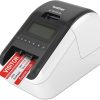
Brother QL-800 High-Speed Professional Label Printer
Original price was: KSh 32,000.00.KSh 29,500.00Current price is: KSh 29,500.00.
- USB connectivity for quick and easy set-up
- Print labels up to 62mm wide from your PC or Mac
- Built-in label editing software doesn’t need to be installed. Simply click to run
- Print in black and red without needing ink or toner
- Print on pre-sized labels (for your address or shipping labels) or continuous rolls up to 62mm wide (for indoor/outdoor signage)
Brother QL-800 High-Speed Professional Label Printer
Brother QL-800 is the perfect choice for office workers who need a reliable and fast address-label printer. Quickly print labels from your PC or Mac with this high-speed label printer. Thanks to the integrated P-touch Editor Lite label design software it is so easy to use – simply connect to your computer, click the icon to launch the software, and design and print your labels.
Or use the advanced P-touch Editor label design software to include barcodes, images, and other advanced functions.
You’re also able to produce labels with both black and red print without the need for ink or toner – ideal to highlight important information on a label.
The integrated cutter allows custom-sized labels up to one meter in length when using one of the continuous label rolls.
Product Features
Brother QL-800 For Business
Offering versatility, convenience, and Microsoft integration, the QL-800 delivers totally hassle-free address (and other) label printing. When used with special DK rolls, you can print labels that can contain both black and red prints without needing any ink.
When you can print custom-sized labels up to one meter in length using the built-in cutter and continuous rolls, you can see why this is the most advanced label printer available.
Black and red printing without ink
Brother DK label rolls are available in a range of traditional die-cut (pre-sized) labels, or continuous, that allows the built-in cutter to cut your label to the precise length (up to one meter). Plus, draw attention to important information by including red* on your labels too – ideal for highlighting use-by dates, allergens, and other critical information.
Click and print from Microsoft Word/Excel/Outlook
The P-touch Editor add-in for Microsoft Office (Windows only) lets you print labels with the information you use every day, with just one click. Highlight your text, click the add-in, and the label is printed. Alternatively, text saved in an Excel or .csv file can be imported into P-touch Editor and merged with your label layout to print many labels with the same format (design). Ideal for printing addresses, products, and pricing labels.
Large range of labels for any application
The QL series label printers use Brother DK rolls – that easily slot in for fast label changes. Several types are available: Pre-sized die-cut adhesive labels in paper and plastic film material. Continuous adhesive labels in paper and plastic film material that can be cut to the length you need (up to 1 meter). Non-adhesive card is ideal for receipts and name badges. Removable adhesive for repositioning labels.
The easy-to-use label printer
Developed for use in busy workplaces, this advanced label printer is easy to set up and use. Using the same technology as USB pen drives, simply connect to your PC or Mac, and run the built-in software without the need to install printer drivers. For more labeling options, download the free P-touch Editor label design software and printer drivers to design and print fully customized labels containing text, frames, barcodes, and images.
Compatible Brother DK Rolls:DK-11201,DK-11202,DK-11203,DK-11204,DK-11207,DK-11208,DK-11209,DK-11218,DK-11219,DK-22113,DK-22205,DK-22210DK-22211,DK-22212,DK-22214,DK-22211,DK-22212,DK-22214,DK-22223,
Product Specifications
| Product Dimensions | 4.9″D x 8.4″W x 5.6″H |
|---|---|
| Controller Type | Android |
| Printer Media Size Maximum | Roll – 2.44″ |
| Included Components | Brother QL800 Label Printer, P-touch editor software and driver, AC power cable, USB cable, DK1201 and DK2251 starter rolls |
| Print media | Labels |
| Scanner Type | Sheetfed |
| Max Input Sheet Capacity | 800 |
| Compatible Devices | PC |
| Sheet Size | 2.44 |
| Duplex | Automatic |
| Hardware Interface | USB |
| Resolution | 300 x 300 |
| Additional Printer functions | Print Only |
| Control Method | App |
| UPC | 012502647454 012502646327 |
| Global Trade Identification Number | 00012502647454 |
| Item Weight | 2.5 pounds |
| ASIN | B01N49R9KP |
| Item model number | QL800 |
| Batteries | 2 Lithium Polymer batteries required. |
| Customer Reviews |
4.3 1,895 ratings
4.3 out of 5 stars |
| Best Sellers Rank | #11,892 in Office Products (See Top 100 in Office Products) #40 in Desktop Label Printers |
| Is Discontinued By Manufacturer | No |
| Date First Available | December 3, 2016 |
| Manufacturer | Brother Printer |
| Country of Origin | China |
Brand
Brother
Be the first to review “Brother QL-800 High-Speed Professional Label Printer”
Related products
Sale!

Label Printers
Original price was: KSh 112,000.00.KSh 96,000.00Current price is: KSh 96,000.00.
Sale!
Label Printers
Original price was: KSh 63,000.00.KSh 60,800.00Current price is: KSh 60,800.00.
Sale!
Label Printers
Original price was: KSh 120,550.00.KSh 116,550.00Current price is: KSh 116,550.00.
Sale!
Label Printers
Original price was: KSh 10,000.00.KSh 9,750.00Current price is: KSh 9,750.00.
Sale!
Label Printers
Original price was: KSh 18,000.00.KSh 14,400.00Current price is: KSh 14,400.00.
Sale!
Label Printers
Original price was: KSh 7,000.00.KSh 4,500.00Current price is: KSh 4,500.00.
Sale!
Label Printers
Original price was: KSh 270,000.00.KSh 268,000.00Current price is: KSh 268,000.00.
Sale!

Label Printers
Original price was: KSh 54,000.00.KSh 47,500.00Current price is: KSh 47,500.00.
Reviews
There are no reviews yet.